 DecibelDock
Sound level meter
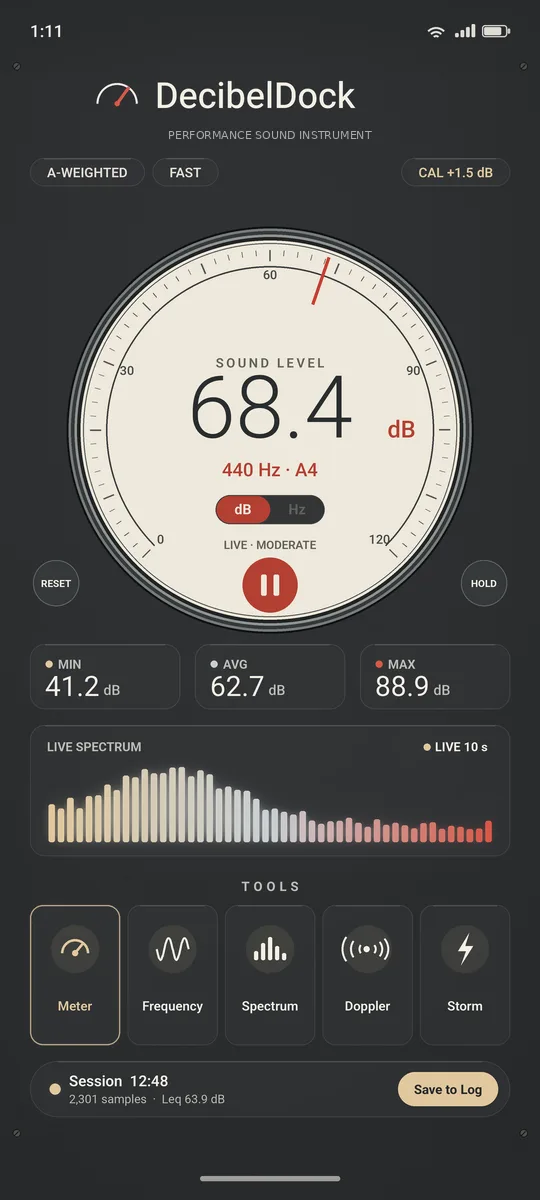
DecibelDock's main meter shows a live approximate sound level on a performance gauge, with session min, average, max and peak hold. It is designed to …
191Labs LLC · Android
Performance sound instrument for Android.
A readable approximate dB meter with Frequency Finder and Tuner, Doppler speed, flash-to-bang Distance, Direction, Identify and Spectrum — designed with honest limits, local history and no ads.
Free basic meter · 2-week advanced preview · Optional one-time Pro · No ads, no accounts
Listing placeholder — Play URL will be added at launch (see LAUNCH.md).
Tools
Every tool is built for exploration and comparison on a phone — with plain-language limits instead of inflated claims.
DecibelDock's main meter shows a live approximate sound level on a performance gauge, with session min, average, max and peak hold. It is designed to …
Frequency Finder shows the live main frequency in hertz when the tone is clear. Use it for hums, fans, notes and pitched sounds — and switch into Tune…
Tuner mode lives inside Frequency Finder. Pick Chromatic or an instrument preset, watch the cents needle, and adjust A4 from 430 to 450 Hz.…
Doppler listens for a pitch drop as a vehicle passes a stationary phone and turns that into a rough speed estimate. It is educational, not radar.…
Distance times the gap between a flash you see and the boom you hear. Use Lightning or Fireworks mode. Tap timing stays simple; automatic mode uses th…
Direction helps you find where a sound is louder. Calibration maps levels as you turn; then the meter can follow the loudest live heading. It is appro…
Identify listens on the device and shows best-guess labels for what it hears. Scores are model likelihoods, not certainty. Mixed sounds and phone proc…
Spectrum expands on the main console instead of opening a separate dead-end screen. See frequency strength, freeze a trace, and view octave bands whil…
DecibelDock keeps tool history on your phone. Audio processing stays on the device. Optional recordings are off by default, and clips never upload the…
DecibelDock separates how the meter is drawn from which color theme you use. Pick a style that fits the job, then a theme that fits the mood.…
Look & feel
Styles are separate from color themes. Each tool can keep its own default style. Performance Gauge is the factory look.
Meter style
Meter style
Meter style
Meter style
Meter style
Meter style
Meter style
Honest limits
Most phone mics cannot measure much above about 120 dB. DecibelDock warns when the mic is overloaded.
Direction, Doppler and Distance are approximate and depend on your phone. Written reasons appear when a result cannot be trusted.
Not a calibrated meter. Not for medical, hearing-safety, occupational-safety or legal-evidence use.
Pricing
No ads. No subscription. Confirm the live Play price when the listing ships.
$0
$4.99 launch · then $7.99
Prices are planned store pricing. The app shows Play's localized price when available. Product decibeldock_pro is created in Play Console only with Bill's OK.
Learn
Educational articles on decibels, weighting, phone limits, tuning, Doppler, flash-to-bang and more — each linking into the feature pages.
FAQ
No. It is an approximate phone meter for comparison and exploration. It is not calibrated or certified, and it is not for medical, hearing-safety, legal or compliance use.
Advanced tools are available during a two-week preview with simple daily use counts (five uses per advanced tool per day, resetting at local midnight). After that, the basic meter stays free forever. Advanced tools need the one-time Pro unlock, or you can pick one advanced tool to keep free for another month.
Pro is a one-time unlock planned at $7.99 regular price with a $4.99 launch sale. Confirm the live price in Google Play when the listing is live. No subscription.
Audio processing stays on your phone. Optional recordings are off by default and stay on the device unless you explicitly export them. 191Labs does not collect readings, audio or camera images. Buying Pro uses Google Play Billing.
Most phone microphones overload near that region. A taller scale would not create more trustworthy absolute readings. DecibelDock warns when the mic is overloaded.
No. They are approximate and depend on your phone. Direction depends on the mics; Doppler is not radar; Distance is not a lightning safety tool. The app shows written limits and rejection reasons when it cannot trust a result.
DecibelDock is in active QA. The public listing and install button go live when Bill approves launch.
Coming soon toGoogle Play